Repositories
Repositories
Partially Available
Scope note — Viewing, searching, refreshing, and filtering the GitHub repository catalogue are available now. Add, Remove, Bulk actions, Edit, and More row actions are visible in the UI but not yet implemented; they show a future-milestone message when used.
Overview
The Repositories page provides a central view of all repositories available to your authenticated GitHub account.
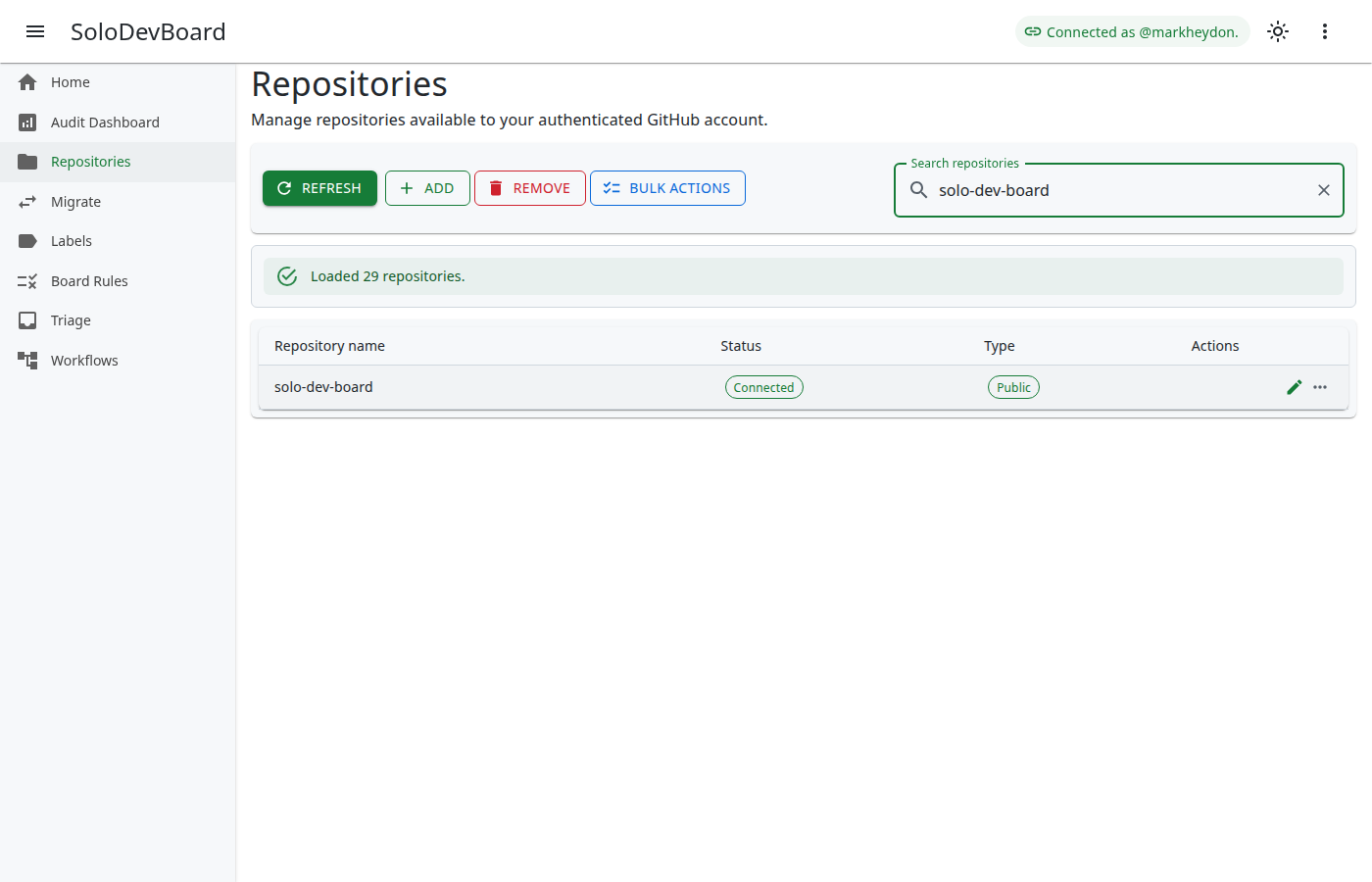
Key goals of the Repositories page:
- Make accessible repositories visible in one responsive catalogue.
- Support quick search and refresh after connectivity changes.
- Identify open-source project repositories using the GitHub
open-sourcetopic. - Provide a foundation for later catalogue management (add, remove, bulk, and row actions).
How to Use
View and search repositories
- Open Repositories from the left navigation menu.
- Use the search field to filter repositories by name if needed.
- Use Reload from GitHub to reload the catalogue after connectivity changes without clearing your search or filter.
- Review status chips (Connected or Archived) and visibility chips (Public or Private).
Filter open-source project repositories
- Use the catalogue filter toggle group below the command strip.
- Choose All to show the full catalogue (default).
- Choose Open source to show only repositories whose GitHub topics include
open-source. - Choose Not open source to show the complement — useful for finding repositories that should be tagged on GitHub but are not yet.
- Name search and catalogue filters combine (logical AND). Changing the filter does not clear the search field.
- Public visibility is independent of open-source classification. A public repository without the
open-sourcetopic is not treated as open source.
What you can do now
- View accessible repositories in a responsive data grid.
- Search repositories by name.
- Reload the catalogue from the command strip with Reload from GitHub.
- Filter the catalogue to Open source or Not open source using the built-in toggle group.
- See connection status and visibility at a glance.
- Use the phone-width stacked grid layout without horizontal overflow.
What is coming later
- Add — add repositories to a managed SoloDevBoard catalogue beyond the live GitHub listing.
- Remove — remove selected repositories from that catalogue.
- Bulk actions — run multi-repository operations from the command strip.
- Edit (row action) — edit repository metadata or catalogue settings for a single repository.
- More (row action) — overflow menu for additional per-repository management.
Until those ship, each control opens an informational snackbar stating that the action will be available in a future milestone.
Page layout
- Command strip — Reload from GitHub (live), plus Add, Remove, and Bulk actions (stubs). On mobile the stub actions are grouped into a compact actions menu.
- Search field — Filter repositories by name.
- Catalogue filter — Exclusive toggle group with All, Open source, and Not open source. The filter is not persisted across page reloads.
- Data grid — Repository name, status chips, visibility chips, and stub row actions. On phone-width viewports the grid stacks each field so names wrap, chips stay fully visible, and row actions remain tappable without horizontal overflow.
- Feedback region — Loading, empty, success, error, filter-empty, and catalogue status messages. Placeholder stub actions use snackbar toasts only.
Empty and error states
- No repositories found: The page explains that none were returned for your account.
- No repositories match this filter: When the catalogue has rows but the selected filter excludes them all, the page explains whether no repositories have the
open-sourcetopic or whether every repository already has it. When a name search is also active, the page explains that nothing matched both the search and the filter. - Loading: A progress indicator appears while repositories load.
- Errors: If GitHub cannot be reached, an error message appears with a retry action.
Troubleshooting
If repositories do not appear or loading fails:
- Confirm GitHub authentication is working (connected status in the app bar).
- Check that your account can access the repositories you expect.
- Use Reload from GitHub or Try again to retry after resolving connectivity issues.
If open-source filters look wrong:
- Confirm the repository has the
open-sourcetopic on GitHub (topics are stored in lowercase). - Use Reload from GitHub after changing topics on GitHub so the catalogue picks up the latest list-repos payload.
Last updated on